What is VLAN? Simplifying Networking with My Homelab Story

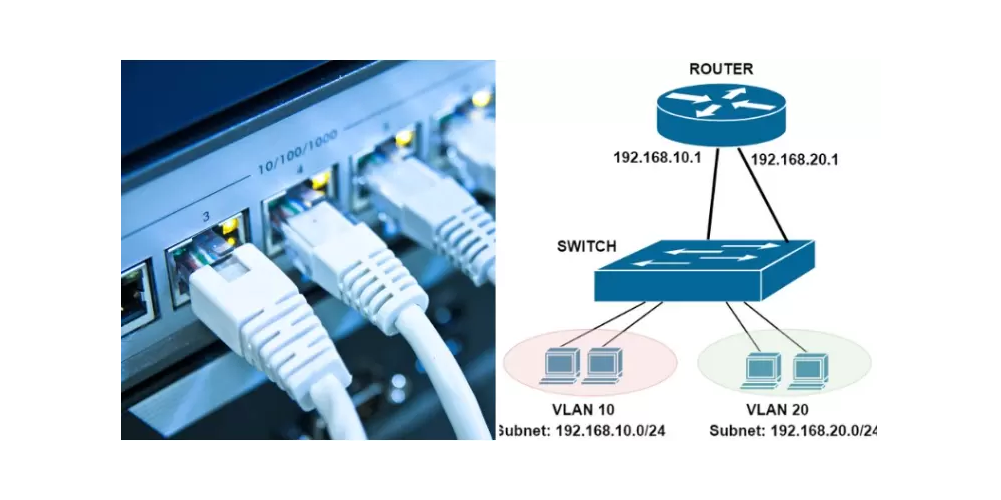
When you start learning about networking, one of the first terms you’ll come across is VLAN. It might sound complicated at first, but once you understand the basics, VLANs can completely change how you manage and secure your home or office network. In this post, I’ll explain what a VLAN is, go over some quick networking concepts, and share my personal story of experimenting with VLANs in my homelab.
Quick Networking Refresher: LAN vs VLAN
- LAN (Local Area Network):
A LAN is simply a network within a small geographic area—like your home, office, or school. All devices connected to the same LAN can communicate freely with each other as if they’re in one big “room.” - The Problem with Flat Networks:
If every device in your LAN is connected without separation, you’ll quickly run into issues. Your smart home devices, work laptop, gaming PC, and media server are all talking on the same network. This means unnecessary traffic, potential security risks, and limited control. - Enter VLAN (Virtual Local Area Network):
A VLAN allows you to segment one physical network into multiple logical networks. Think of it like drawing invisible walls inside your network. Devices inside one VLAN cannot directly talk to another VLAN unless you allow it through routing or firewall rules.- Example: You can keep your IoT devices on one VLAN, your personal computers on another, and your servers on a third.
This separation not only improves security but also makes your network cleaner and easier to manage.
Why IoT Devices Must Be Isolated
Smart devices (IoT devices) like cameras, smart bulbs, thermostats, and even smart TVs are incredibly convenient—but they also pose real security risks:
- Weak Security:
Many IoT devices use outdated firmware, weak passwords, or lack regular security patches. Hackers often target them first because they’re the easiest way into your network. - Always Connected:
Unlike your laptop or phone, IoT devices are always online, quietly talking to cloud servers. If compromised, they can become a gateway for attackers. - Lateral Movement Risk:
If an IoT device on your flat LAN is hacked, an attacker could scan your entire network, reaching your computers, NAS, or home server. - Privacy Concerns:
Some smart devices collect more data than you realize. Isolating them ensures they can only talk to the internet—not snoop around your personal devices.
Solution: By placing IoT devices on their own VLAN, you create a “walled garden” where they can only connect to the internet and not directly communicate with your sensitive devices. If a smart bulb gets hacked, it stays trapped in its VLAN without access to your work laptop or family photos.
My Journey Learning VLANs
Like many IT enthusiasts, I first stumbled into VLANs while experimenting in my homelab. Here’s how it went:
Step 1: Playing with Cheap TP-Link Switches
I started with some budget-friendly TP-Link unmanaged and later smart switches. At first, I didn’t even realize the power VLANs offered. Once I figured out how to configure isolated VLANs, I was able to create separate networks for my testing servers, home devices, and IoT gadgets.
It was an exciting moment—the feeling of controlling how traffic flows in my network without buying expensive enterprise equipment.
Step 2: Migrating to TP-Link Omada
As my homelab grew, so did the complexity of managing it. That’s when I discovered TP-Link Omada, an SDN (Software Defined Networking) solution. Omada made VLAN management much easier with a central controller interface.
Instead of logging into each switch or access point individually, I could manage VLANs, firewall rules, and wireless SSIDs all from one dashboard. This brought enterprise-like simplicity to my home network.
Some highlights of my Omada setup:
- Multiple SSIDs tied to different VLANs (e.g., IoT Wi-Fi isolated from main Wi-Fi).
- Centralized policy management for traffic routing.
- Easier scalability—adding more switches and access points without redoing configurations manually.
Why VLANs Matter for a Smart Home or Homelab
- Security: Isolate IoT devices from your personal computers and data.
- Performance: Reduce unnecessary broadcast traffic across your whole network.
- Organization: Keep testing environments separate from production-like services.
- Privacy: Prevent smart devices from accessing your private data.
- Scalability: Makes it easier to grow your network without chaos.
Final Thoughts
Learning VLANs was one of the biggest turning points in how I think about networking. What started with tinkering on cheap switches grew into a structured, scalable, and secure home lab environment. Today, with TP-Link Omada managing my SDN-based VLAN setup, I spend less time troubleshooting and more time building new projects.
If you’re just starting out, don’t be afraid to experiment. VLANs may sound intimidating, but once you set up your first isolated network—especially for your IoT devices—you’ll realize it’s not only fun but also essential for protecting your home.
 Sudeep Shrestha
Thank you so much for taking the time to read my post! Your support and engagement truly mean a lot and inspire me to keep creating and sharing more valuable content. If you enjoyed this post, I’d love to hear your thoughts—feel free to leave a comment in the box below and join the conversation. And if you’d like to stay updated with the latest posts, tips, and insights, don’t forget to subscribe to my newsletter. By joining, you’ll be the first to know when new content is published, so you never miss an update.