Understanding Internet Bandwidth: How Much You Need at Home and How to Test It


In today’s connected world, our daily lives revolve around the internet — from streaming Netflix and attending Zoom meetings to gaming and managing smart home devices. But one question often comes up: how much internet bandwidth do I really need? Let’s dive into what bandwidth is, how to determine the right amount for your home, and how you can easily test your internet speed.
What is Bandwidth?
In simple terms, bandwidth refers to the maximum amount of data that can be transmitted over your internet connection in a given amount of time. It’s usually measured in megabits per second (Mbps).
- Download speed: How fast you can pull data from the internet (e.g., watching a YouTube video or loading a web page).
- Upload speed: How fast you can send data to the internet (e.g., uploading a file or sending an email attachment).
Think of bandwidth like a highway — the wider the highway (higher bandwidth), the more cars (data) can travel smoothly at the same time. If too many cars try to use a narrow road, traffic slows down — just like your internet during peak usage.
How Much Bandwidth Do You Need at Home?
The right amount of bandwidth depends on how many people use the internet at once and what they do online. Here’s a general guide:
| Usage Type | Recommended Speed (per user/device) |
|---|---|
| Basic browsing & email | 1–5 Mbps |
| Streaming HD video (Netflix, YouTube) | 5–10 Mbps |
| Streaming 4K video | 15–25 Mbps |
| Online gaming | 10–25 Mbps |
| Video calls (Zoom, Teams, FaceTime) | 3–10 Mbps |
| Smart home devices (camera, thermostat, etc.) | 1–5 Mbps each |
Now multiply these numbers based on your household activity.
Example:
If you have a family of four, with two people streaming, one working remotely on video calls, and smart home gadgets running in the background — you might need at least 150–200 Mbps for smooth performance.
For power users, gamers, or anyone with multiple 4K streams and cloud backups, going with 500 Mbps or even Gigabit internet makes a big difference.
Internet Speed Plan Comparison
Here’s a quick comparison to help you choose the right plan for your household:
| Plan Speed | Ideal For | Household Size | Typical Use Case |
|---|---|---|---|
| 50 Mbps | Light users | 1–2 people | Browsing, emails, SD video streaming |
| 100 Mbps | Moderate users | 2–3 people | HD streaming, social media, video calls |
| 300 Mbps | Average family | 3–5 people | Multiple HD/4K streams, remote work, smart home |
| 500 Mbps | Power users | 4–6 people | Gaming, 4K streaming, cloud backup, home office |
| 1 Gbps (1000 Mbps) | Tech enthusiasts | 5+ people | Heavy streaming, multiple 4K devices, NAS backup, home server setups |
If you’re someone who works from home, uses smart home automation, or runs media servers, upgrading to at least 300–500 Mbps will give you noticeable stability and comfort.
⚙️ How to Test Your Internet Bandwidth
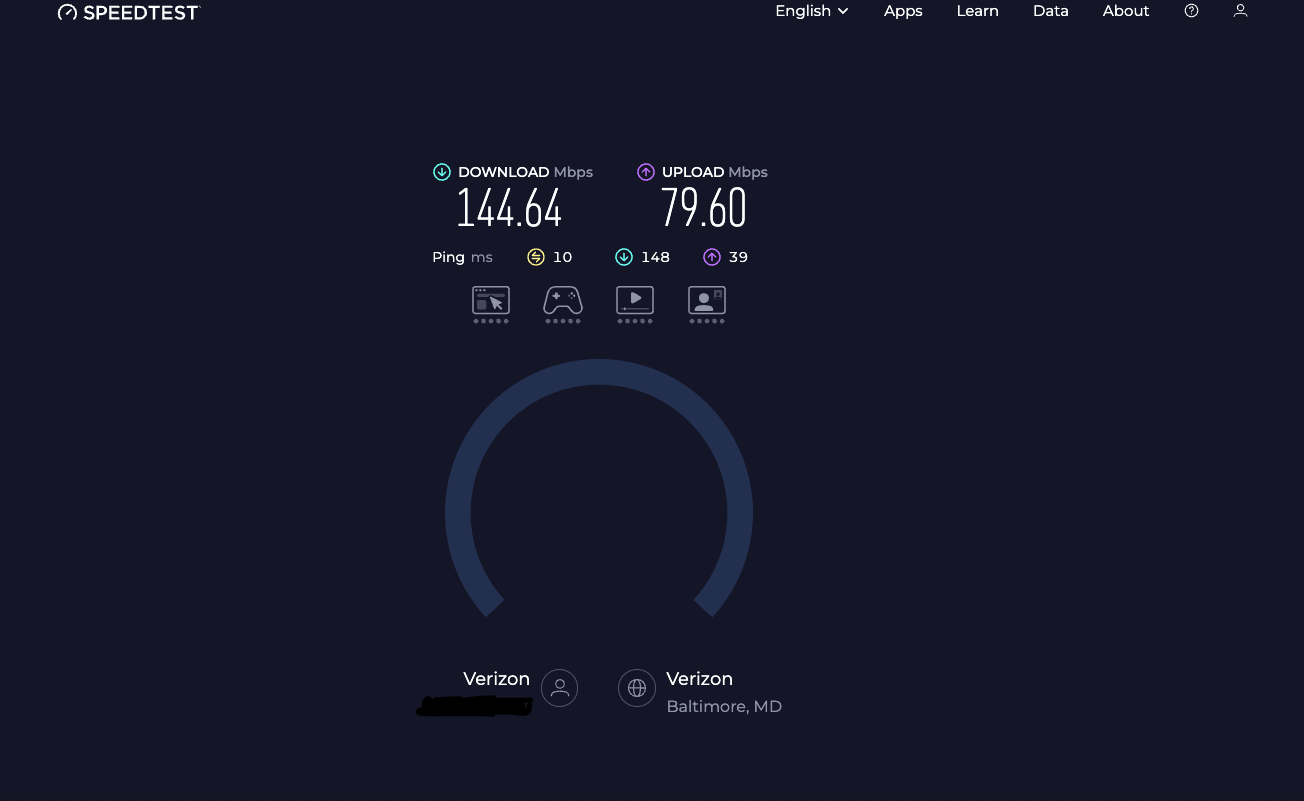
Testing your bandwidth is easy and free. Here’s how:
Step 1: Visit a Speed Test Website
Go to one of these popular sites:
- Speedtest.net by Ookla
- Fast.com by Netflix
- Google Speed Test (just type speed test in Google)
Step 2: Start the Test
Click Go or Start — it only takes about 30 seconds.
Step 3: Check the Results
You’ll see:
- Download Speed – how fast data comes to you.
- Upload Speed – how fast you send data out.
- Ping (Latency) – how quickly your device communicates with the server (important for gaming and video calls).
Step 4: Compare Results
If your actual speed is much lower than what you’re paying for, try:
- Restarting your router or modem.
- Testing via a wired connection (Ethernet) instead of Wi-Fi.
- Checking for devices hogging bandwidth (e.g., big downloads).
If the problem persists, contact your ISP (Internet Service Provider).
Personal Tip
At home, I always recommend running speed tests from multiple devices — like your phone, laptop, or smart TV — to see how consistent the network is. In my case, having a 300 Mbps connection gives me the perfect balance for streaming, remote work, and smart home automation.
Final Thoughts
Bandwidth is the backbone of your online experience. Whether you’re setting up a home office, building a smart home, or simply watching your favorite shows, knowing your bandwidth needs ensures everything runs smoothly. Regularly test your internet to make sure you’re getting what you pay for — and if not, it might be time to upgrade your plan or improve your Wi-Fi setup.
Thank you so much for taking the time to read my blog post! Your support and engagement truly mean a lot and inspire me to keep creating and sharing more valuable content. If you enjoyed this post, I’d love to hear your thoughts—feel free to leave a comment in the box below and join the conversation. And if you’d like to stay updated with the latest posts, tips, and insights, don’t forget to subscribe to my newsletter. By joining, you’ll be the first to know when new content is published, so you never miss an update.
Football apparel often links a city, a club, and a shared set of memories when the design is tied to an unforgettable match or rivalry. The matchday image of Rangers is often shaped by the shirt worn in important games and title runs. When comparing home, away, and third kit styles, Real Madrid football shirts remains one way to link football history with the practical choice of a shirt. In conversations about club identity, the comparison between versions feels useful and grounded.