UGREEN NAS: Synology Alternative


UGREEN, long known for accessories, hubs, and power/docking solutions, has more recently stepped into the NAS market with its NASync series and its own OS called UGOS Pro. UGREEN NAS US+3Forbes+3UGREEN NAS US+3
Some key features of UGREEN NASync / related models:
- Hardware
UGREEN uses Intel’s 12th Gen chips (e.g. Core i5, Pentium Gold 8505) for many of its higher-end models. Android Central+3UGREEN NAS US+3UGREEN NAS US+3
They offer multiple drive bays (2, 4, 6, up to 8), plus extra slots for M.2 NVMe SSDs for caching. UGREEN NAS US+2UGREEN NAS US+2 - Connectivity & Throughput
Dual 10 GbE ports in many models; Thunderbolt 4 in higher-end units; fast USB / USB-C ports. UGREEN NAS US+3UGREEN NAS US+3UGREEN NAS US+3
The ability to aggregate 10GbE ports for higher throughput. UGREEN NAS US+1 - Software & Features
UGOS Pro is the OS. It includes built-in RAID levels: JBOD, RAID 0/1/5/6/10 etc. UGREEN NAS US+2UGREEN NAS US+2
AI-assisted features are a differentiator: photo organization (faces, scenes, objects), duplicate removal, semantic search, OCR etc. UGREEN NAS US+3UGREEN NAS US+3UGREEN NAS US+3
Security: support for standard NAS security, local encryption, remote access etc. Also UGREEN claims ETSI EN 303 645 certification in some models. UGREEN NAS US - Pricing & Value
UGREEN seems to undercut Synology on similar‐hardware specs. If you want strong networking (10GbE, Thunderbolt), modern CPUs, and lots of drive bays, UGREEN tends to offer more “bang for buck.” NAS Compares+2UGREEN NAS US+2
Synology NAS: What It Offers
Synology has been in this space a long time and is often considered the gold standard in many respects. Here are its strengths (some of which UGREEN currently matches; some it still leads on).
- Mature Software Ecosystem
Synology’s DiskStation Manager (DSM) has years of development, a large user base, many apps (Synology Photos, Synology Drive, Hyper Backup, Active Backup, etc.), long-term updates & patches, and lots of third-party integration. - Support & Community / Trust
Because Synology has been around, there are many more how-tos, guides, tools, plugin support, backups, and a more proven track record—both in enterprise and home setups. - Refined Features & Polish
Things like backup-to-cloud, cross-syncing of cloud services, hardware acceleration, media services, extensive plug-ins, virtualization features, etc., are in many Synology products, often with polish and reliability. - NAS Ecosystem & Hub
Synology’s strength is also in how all its services tie together, often in the same interface. For users who want “everything in one place,” the mature workflow, strong backward compatibility, and enterprise features (like snapshots, high availability in some models, advanced security tools) are strong selling points.
UGREEN vs Synology: Key Comparisons
Here are some side-by-side comparisons of where UGREEN is strong, where it lags, and what trade-offs to consider.
| Feature | UGREEN’s Strengths | Areas Where Synology Still Has Edge / UGREEN’s Weaknesses |
|---|---|---|
| Hardware Spec for Price | At similar price points, UGREEN often gives you more hardware: more drive bays, faster network ports, modern CPUs. Good bang-for-dollar. UGREEN NAS US+2NAS Compares+2 | Synology may lag in raw hardware at certain price points; but they often compensate via mature software features. Also, Synology has premium models for demanding use. |
| AI Features / Modern Innovation | UGREEN is pushing into local AI, semantic search, photo recognition, etc. These are attractive for home / creative users. UGREEN NAS US+1 | Synology has some smart features too, but its AI features are less aggressive / newer. On the flip side, UGREEN is newer and may have bugs, less stability. |
| Software Ecosystem, Apps & Maturity | UGOS Pro is growing; UGREEN adds features via updates and community input. For many users, the feature set suffices (RAID, photo albums, backups, media streaming). UGREEN NAS US+1 | Synology’s DSM is more mature, more polished, more apps, more third party support. The backup tools (Hyper Backup, Snapshot Replication etc.) are more mature. Features like cloud syncs, link aggregation, virtualization etc. are more established. |
| Reliability, Support & Longevity | UGREEN offers warranties (2-3 years), good hardware design, decent security features. For many home / small business setups, reliability may be sufficient. UGREEN NAS US+1 | Synology has a longer track record. More proven. More devices in the field. More patches over time. More community knowledge (which helps with troubleshooting). Also, support infrastructure tends to be more mature. |
| Flexibility / Power User Features | NIC aggregation, Thunderbolt, high bandwidth ports, expansion (M.2 SSD slots) are strong in UGREEN. For users who value raw hardware power, UGREEN is appealing. UGREEN NAS US+2UGREEN NAS US+2 | Synology tends to have more refined and more varied software tools, e.g. for virtualization, containers, hybrid cloud, snapshot backups, more granular roles for users, backup to cloud, etc. UGREEN may lag in some of these, or the features may be newer and less mature. Community feedback notes some missing features (granular restore, app-data backup etc.) in UGREEN. Reddit |
Real-User Feedback: What People Are Saying
Putting specs aside, here are some things users are saying in forums / Reddit etc. These shed light on what it’s like in real use.
- Some users like the performance and hardware of UGREEN, especially for media server / home media use, backups, etc. But they note that certain backup features are “still immature.” For example: no very granular restore, or inability to back up app data in some cases. Reddit
- Others are considering switching from Synology to UGREEN, but are hesitant because of concerns about missing OS features or whether the mobile apps / sync / photos / user access control are as good. Reddit+1
- Some migrations (data copy, rsync etc.) are working fine; people are managing data migrations themselves. Reddit+1
Who Should Consider UGREEN (and Who Maybe Shouldn’t)
Ideal Users for UGREEN
- Those who want strong hardware at a lower cost (i.e. more drive bays, higher throughput)
- People focusing on media storage, photo/video workflows, and who care about fast transfers, modern network capabilities (10GbE, Thunderbolt etc.)
- Home users or small business users who are okay with somewhat newer software / fewer mature features but care more about performance and value
- Users who like the idea of AI-augmented features (photo recognition, smart search) and local AI tools
Users Who Might Stay With / Prefer Synology
- Those who need very mature, stable software, especially for business-critical backups and disaster recovery
- Folks who rely heavily on Synology’s specific tool ecosystem (Drive, Hyper Backup, Snapshot, virtualization, cloud sync, etc.)
- Environments where long-term support, frequent security updates, and large community knowledge are important
- Users who prefer fine-grained backup / restore options, very polished mobile apps, etc.
What To Check If You’re Switching from Synology to UGREEN
If you’re considering moving from Synology → UGREEN, here are some things to verify / test ahead of time.
- Backup and Restore Granularity
- Can you restore single files / single apps / configurations easily?
- Does the backup app include app data, system settings as Synology’s tools do?
- Cloud & Multi-Service Sync
- If you use Dropbox, OneDrive, Google Drive, etc., ensure UGREEN (or UGOS) supports syncing with them.
- If you use Synology’s “Drive” or “Cloud Sync / Cloud Sync tasks”, check how analogous features are supported.
- Mobile Apps / Remote Access
- Check whether UGREEN’s mobile apps allow you to see only the services you want, with permissions.
- Does the app integrate well with iPhone / Android file systems, allow photo uploads etc.
- Software Updates, Security, and Community & Support
- How frequent are updates? Vulnerability patches?
- How big is the user community? Good documentation, forums, Discord / Reddit etc.
- Hardware & Future Proofing
- How many bays, what max drives can it support? Drive mix (SATA, NVMe)?
- Does it support link aggregation, faster NICs, Thunderbolt etc., if you will need it.
- Migration Complexity
- How easy is it to migrate data, user accounts, permissions etc.?
- How well are standards like rsync, SMB, NFS supported?
 Sudeep Shrestha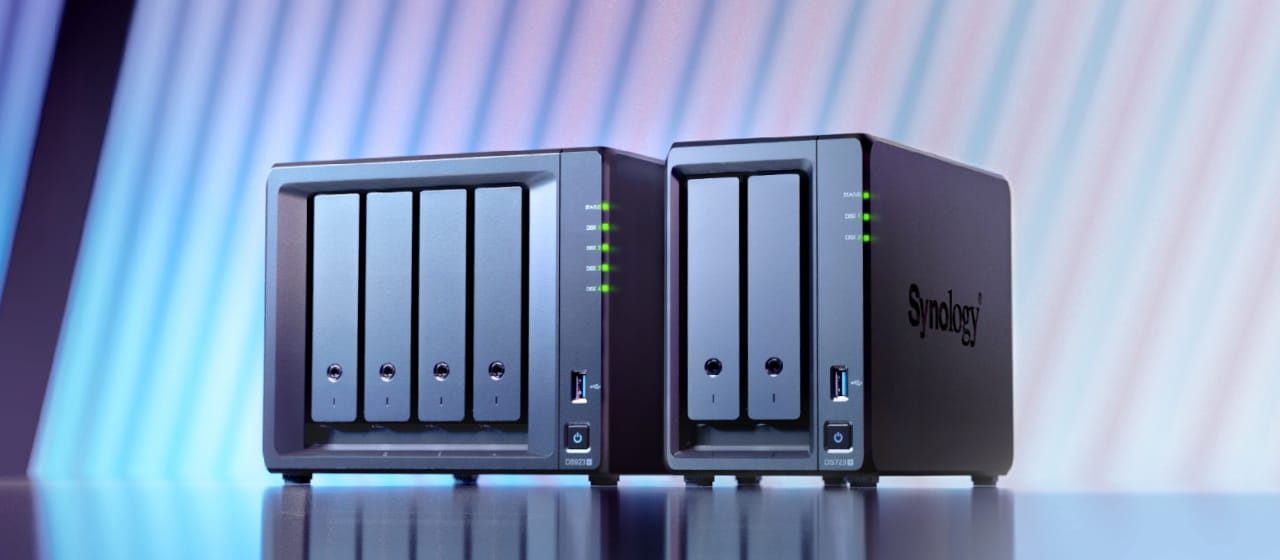
Conclusion
If I had to sum up: UGREEN NAS is a compelling alternative to Synology, especially for users who value hardware performance, modern connectivity, and AI-enabled features, and who are okay with “newer” software (and the occasional rough edge). Synology remains strong in software maturity, polish, stable enterprise features, and long-standing trust and ecosystem.
If I were you, I’d try to define what are the features you cannot live without (e.g. backup granularity, cloud sync, mobile photo upload, security, etc.), compare models from both sides with those in mind, maybe even try hands-on if possible.
Discussions about third kits often show how clubs experiment while keeping a link to identity as the difference between authentic and fan styles can shape how a shirt is used. Discussions about modern kit technology show how football apparel connects design choices with supporter habits. For fans choosing a shirt connected to a favourite side, third kit football shirts is a phrase that sits comfortably in content about football identity. That perspective adds context around collecting, gifting, and choosing a team shirt.