Types of Hard Drives Commonly Used in Personal Computers: HDD, SSD, and NVMe


When it comes to personal computers, one of the most important components is storage. Your storage drive holds your operating system, software, and personal files, making it crucial for both performance and reliability. Over the years, storage technology has evolved, and today the three most common types of drives used in PCs are HDD (Hard Disk Drive), SSD (Solid State Drive), and NVMe (Non-Volatile Memory Express). Let’s dive into what makes each type unique and how they compare.
1. HDD (Hard Disk Drive)

What it is:
The traditional hard disk drive has been around for decades. It uses spinning magnetic platters to store data, with a mechanical arm that reads and writes information.
Pros:
- Affordable: Great cost per gigabyte.
- Large Storage: Commonly available in sizes up to several terabytes.
- Reliable for long-term data storage if handled properly.
Cons:
- Slower read/write speeds compared to SSDs.
- Mechanical parts make it prone to damage if dropped.
- Heavier and noisier than solid-state alternatives.
Best for:
Bulk storage of files, backups, or media libraries where speed is not the top priority.
2. SSD (Solid State Drive)
What it is:
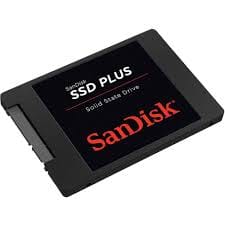
An SSD uses flash memory (like a USB drive) to store data, meaning it has no moving parts. This makes it faster and more durable compared to HDDs. Most SATA SSDs connect to the same ports as traditional hard drives, making upgrades easy.
Pros:
- Much faster than HDDs (boot times, file transfers, and application loading).
- More durable since there are no moving parts.
- Lower power consumption, great for laptops.
Cons:
- More expensive per gigabyte than HDDs.
- Typically smaller in storage capacity compared to HDDs at the same price point.
Best for:
Operating systems, programs, and games where speed and responsiveness matter most.
3. NVMe (Non-Volatile Memory Express)

What it is:
NVMe drives are the next step up from SSDs. They use the PCIe (Peripheral Component Interconnect Express) interface instead of SATA, which allows them to achieve significantly faster speeds. These drives often come in a compact M.2 form factor and look like a small stick of gum.
Pros:
- Extremely fast read/write speeds compared to SATA SSDs.
- Ideal for tasks like gaming, video editing, and running virtual machines.
- Small and lightweight form factor.
Cons:
- More expensive than SATA SSDs and HDDs.
- May require a compatible motherboard slot.
- The speed difference may not be noticeable for casual users doing everyday tasks.
Best for:
Power users, gamers, professionals editing large media files, or anyone who needs maximum performance.
Comparison Table: HDD vs SSD vs NVMe
| Feature | HDD | SSD (SATA) | NVMe (M.2 / PCIe) |
|---|---|---|---|
| Speed | Slow (50–150 MB/s) | Fast (400–600 MB/s) | Ultra-fast (2,000–7,000+ MB/s) |
| Price | Cheapest per GB | Moderate | Expensive per GB |
| Capacity | Up to 20TB+ | Commonly 250GB – 4TB | Commonly 250GB – 8TB |
| Durability | Low (mechanical parts) | High (no moving parts) | Very High |
| Power Use | Higher, drains laptops | Lower, battery friendly | Very Low, most efficient |
| Best For | Storage & backups | Everyday use, gaming, OS | High-end gaming, pro workloads |
Final Thoughts
When choosing a storage drive, consider what you’ll use your computer for:
- HDD: Great for large, budget-friendly storage.
- SSD (SATA): A balanced choice offering speed and reliability for everyday users.
- NVMe SSD: The best option for performance-focused users who want cutting-edge speed.
Many people use a combination—an SSD (or NVMe) for the operating system and applications, plus an HDD for large file storage. This setup gives you the best of both worlds: speed and capacity.
👉 Which storage drive are you currently using—HDD, SSD, or NVMe? Share your setup in the comments
Thank you so much for taking the time to read my post! Your support and engagement truly mean a lot and inspire me to keep creating and sharing more valuable content. If you enjoyed this post, I’d love to hear your thoughts—feel free to leave a comment in the box below and join the conversation. And if you’d like to stay updated with the latest posts, tips, and insights, don’t forget to subscribe to my newsletter. By joining, you’ll be the first to know when new content is published, so you never miss an update.
A shirt from a famous season can become a shortcut to remembering goals and rivalries when a tournament or league season gives the design a lasting meaning. Conversations about matchday clothing make the shirt part of a broader discussion about football culture. For readers interested in tournament memories, River Plate football shirt can connect the shirt to the culture around the game. The appeal of a football shirt makes room for both modern technology and older football memories.