Intel i3, i5, i7, and i9: Understanding Generations and What Really Matters When Buying a Computer.


When shopping for a new computer, you’ll often see terms like Intel Core i3, i5, i7, or i9 along with a generation number such as 12th Gen or 13th Gen. These names can get confusing, but they play a big role in determining your PC’s performance, efficiency, and longevity. Let’s break it down so you can make the right decision when buying your next device.
Intel Core i3, i5, i7, and i9: What Do They Mean?
Intel’s Core series processors are divided into performance tiers:
- Intel Core i3 → Entry-level, good for web browsing, office apps, and light tasks.
- Intel Core i5 → Balanced performance, great for students, casual gamers, and office multitasking.
- Intel Core i7 → High-performance, excellent for gamers, professionals, and content creators.
- Intel Core i9 → Extreme performance for heavy workloads like 3D rendering, AI, and advanced gaming.
Understanding Intel Generations
Each year, Intel releases a new processor generation. A higher generation usually means:
- Faster and more efficient
- Better battery life for laptops
- Support for new technologies (DDR5, PCIe 5.0, Wi-Fi 6/7)
- Improved integrated graphics
👉 For example: An Intel i5 13th Gen can easily outperform an Intel i7 7th Gen, showing that generation matters more than just the “i” number.
Comparison Table: i3 vs i5 vs i7 vs i9
Here’s a simplified comparison to help you choose the right CPU:
| Feature | Intel Core i3 | Intel Core i5 | Intel Core i7 | Intel Core i9 |
|---|---|---|---|---|
| Performance Tier | Entry-level | Mid-range | High-performance | Extreme / Professional |
| Cores/Threads (Latest Gen) | 4–6 cores / 8–12 threads | 6–10 cores / 12–16 threads | 10–16 cores / 16–24 threads | 16–24+ cores / 24–32+ threads |
| Best For | Browsing, email, office apps | Students, casual gaming, everyday multitasking | Gaming, video/photo editing, programming | 3D rendering, AI, heavy video editing, advanced gaming |
| Battery Life (Laptops) | Best (low power use) | Very good | Balanced | Lower (power-hungry) |
| Price | Most affordable | Affordable-mid | Premium | Expensive |
| Future-Proofing | Low | Medium | High | Very High |
What’s More Important When Buying a Computer?
- Prioritize Newer Generations
- A newer i5 often outperforms an older i7.
- Match the Processor to Your Needs
- i3 → Light/basic use
- i5 → Balanced, best value for most users
- i7 → Power users, gamers, professionals
- i9 → Heavy-duty creators, engineers, enthusiasts
- Don’t Forget Other Specs
- RAM: 8GB minimum, 16GB or more for smooth multitasking
- Storage: SSD for speed
- GPU: Dedicated graphics for gaming or editing
- Battery: Important if buying a laptop

Quick Decision Guide
Not sure which processor to choose? Here’s a quick breakdown:
- ✅ If you only browse, watch YouTube/Netflix, check emails, and do office work → Go with Intel i3 (latest generation).
- ✅ If you’re a student, casual gamer, or multitask with Office apps, Zoom, and light editing → Intel i5 is the best value.
- ✅ If you’re into serious gaming, programming, photo/video editing, or need a powerful work machine → Intel i7 is your sweet spot.
- ✅ If you’re a professional video editor, 3D designer, engineer, or gamer who wants maximum performance and future-proofing → Intel i9 is the top choice.
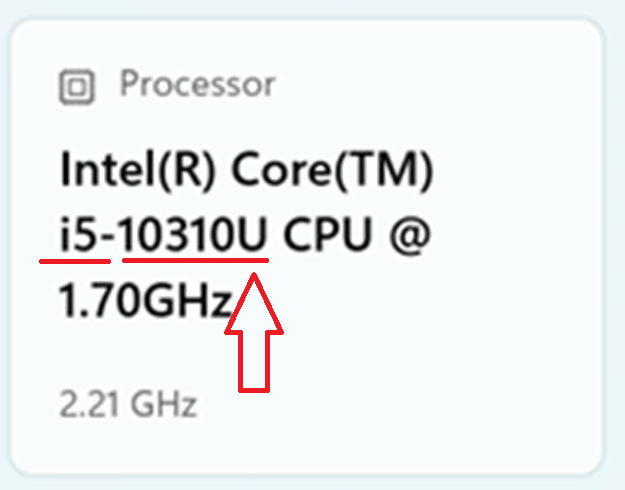
Example of Intel i5 Processor with 10th Generation, Clock speed of 1.70 and max to 2.21 GHz.
Final Thoughts
When buying a computer, both the generation and the processor tier (i3/i5/i7/i9) matter. Always aim for the newest generation your budget allows, then pick the processor tier that matches your actual needs.
For most people, an i5 (latest generation) offers the best balance of price and performance, while i7 and i9 are great for demanding users who need more power.