How to Make a Website and Publish It for Free Using Google Sites

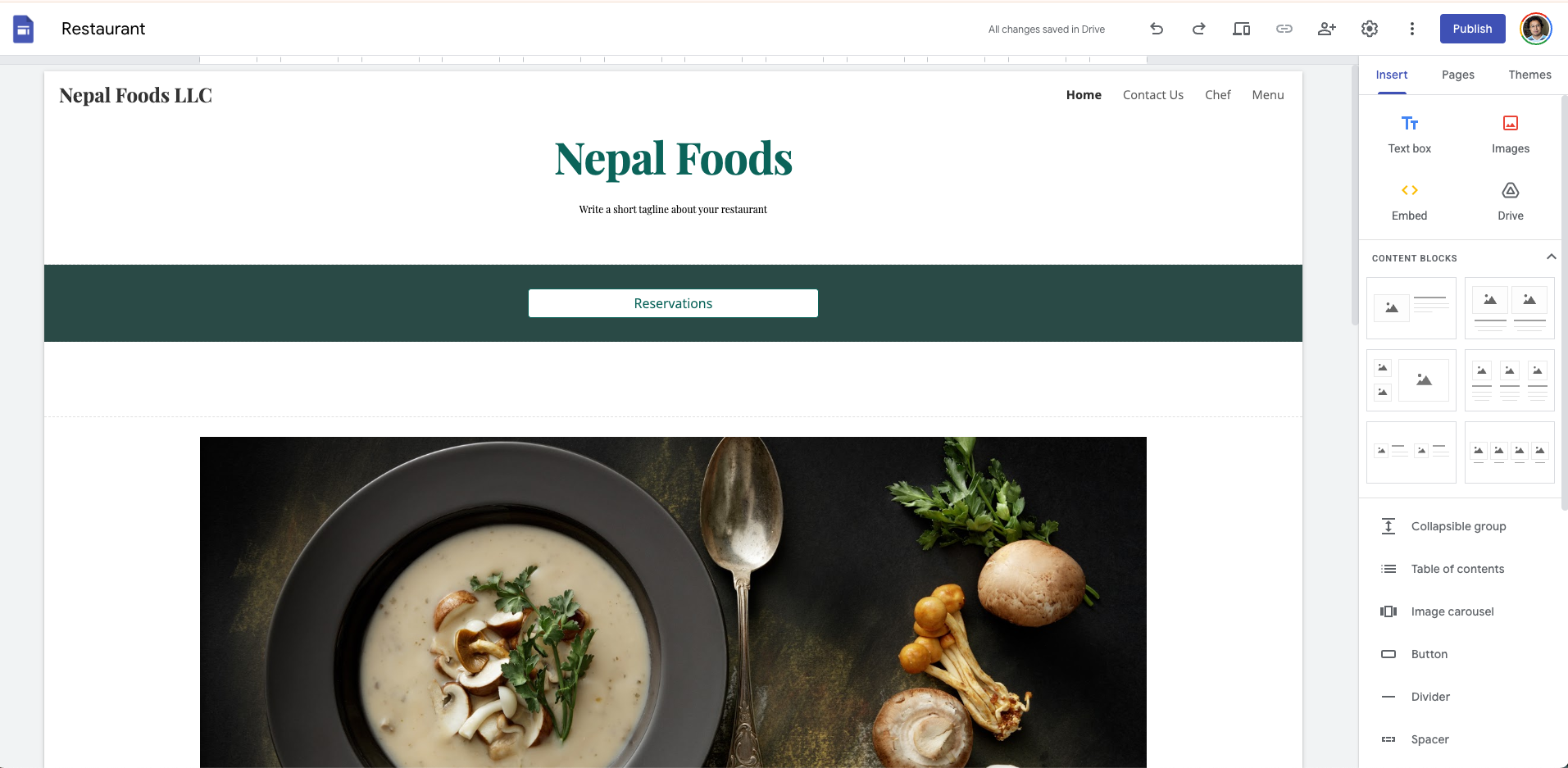
Have you ever dreamed of making your own website but felt overwhelmed by coding, hosting, or costs? Don’t worry—you don’t need to be a web developer or spend money to get started. With Google Sites, you can create and publish a fully functional website for free. It’s a drag-and-drop website builder that makes web design accessible for everyone, whether you’re a student, small business owner, or just someone who wants to showcase a personal project.
Why Google Sites?
Google Sites is part of Google’s free suite of tools. It’s perfect for beginners because:
- Free to use – no hosting or domain costs.
- Drag-and-drop editor – no coding needed.
- Integrated with Google tools – embed Google Docs, Slides, Sheets, or even YouTube videos easily.
- Fast publishing – your website can go live in minutes.
Steps to Create Your Free Website with Google Sites
1. Log into Google Sites
Go to Google Sites and sign in with your Google account.
2. Start a New Site
Click the “+ Blank” button or choose a template. Templates are useful if you want a quick start (like for portfolios, events, or team pages).
3. Design Your Website
- Add a title for your website at the top.
- Use the drag-and-drop sidebar to insert text boxes, images, buttons, or sections.
- Change the theme and colors to match your style.
4. Add Content
Want to show your resume, school project, or business details? Just drag in:
- Text sections for descriptions.
- Images and logos for branding.
- Google Docs/Slides/Sheets to share documents or presentations.
- YouTube videos for tutorials or promotions.
5. Organize Pages
Click on Pages in the sidebar to add multiple pages (like Home, About, Contact). You can reorder them easily by dragging.
6. Preview Your Site
Click the eye icon (Preview) to see how your website looks on desktop, tablet, and mobile.
7. Publish Your Website
When you’re ready, click Publish (top-right).
- Choose a web address (e.g., sites.google.com/view/yourname).
- Your site is now live on the internet for free!
Extra Tips for Beginners
- Keep your design simple and clean.
- Use high-quality images to make it look professional.
- Share your published site link on social media, resumes, or business cards.
- You can also connect a custom domain (like www.yourname.com) if you want a more professional touch—but that part may cost a little extra.
Final Thoughts
If you’re just starting out and dreaming of making your own website, Google Sites is the easiest way to begin. No coding, no fees, and no complicated setup—just drag, drop, and publish. It’s a great first step into the world of web design, and you’ll have a live website in minutes.
So why wait? Head over to Google Sites, start building today, and watch your idea come to life online—for free!
 Sudeep Shrestha
Thank you so much for taking the time to read my blog post! Your support and engagement truly mean a lot and inspire me to keep creating and sharing more valuable content. If you enjoyed this post, I’d love to hear your thoughts—feel free to leave a comment in the box below and join the conversation. And if you’d like to stay updated with the latest posts, tips, and insights, don’t forget to subscribe to my newsletter. By joining, you’ll be the first to know when new content is published, so you never miss an update.
Collectors often read football history through collars, sponsors, badges, and colour patterns as fans compare old designs with the look of newer campaigns. Discussions about fit and sizing choices show how football apparel connects design choices with supporter habits. For people following national team history, Boca Juniors football shirts is part of the discussion around teams, seasons, and supporter culture. When classic designs return, the paragraph can mention shirts without turning into direct advertising.