Bring Your Vintage Landline Phone Back to life.


In today’s world of smartphones and wireless everything, many of us still have a soft spot for old-school telephones—especially those antique rotary and vintage landline phones that once sat in our parents’ or grandparents’ homes. The good news? You can bring those beautiful classics back to life and make them ring again in your home without a landline subscription.
With a simple and affordable gadget called Cell2Jack, you can connect your retro landline phone to your mobile network and use it like the old days—dialing, receiving calls, and hearing that nostalgic ring.
What Is Cell2Jack?
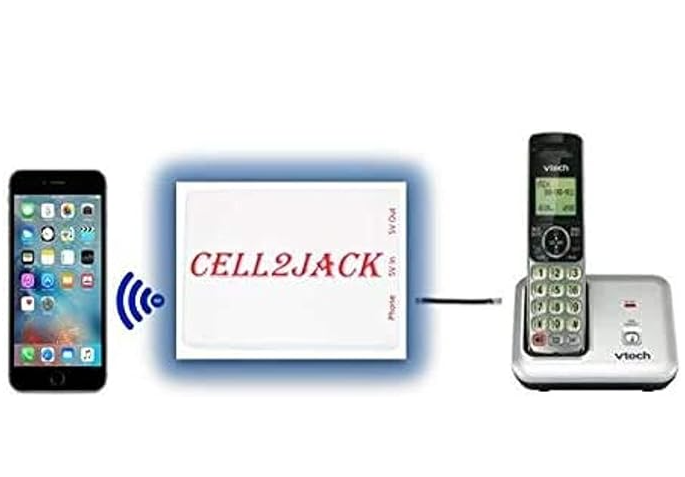
Cell2Jack is a small device that pairs with your cell phone via Bluetooth and allows your old-school home phone to make and receive calls using your cell number. That means:
✅ No landline service required
✅ Works with rotary and touch-tone phones
✅ Uses your existing cellphone plan
✅ Supports caller ID (on compatible phones)
This is perfect for:
- Vintage phone collectors
- Home office setups
- Seniors who prefer traditional handsets
- Anyone who loves the old phone experience
What You Need
To get started, you only need three things:
| Item | Purpose |
|---|---|
| Cell2Jack device | Connects your mobile phone to a landline handset |
| A vintage or modern landline phone | Rotary or touch-tone |
| A smartphone | Android or iPhone with Bluetooth |
How to Set It Up (Step-by-Step)
Step 1: Power the Cell2Jack
Plug the Cell2Jack device into a wall adapter or USB power source.
Step 2: Connect Your Phone
Plug your landline phone into the Cell2Jack RJ11 telephone port.
Step 3: Pair with Bluetooth
- Turn on Bluetooth on your smartphone
- Search for devices and select “Cell2Jack”
- Complete the pairing
Step 4: Test the Line
Pick up the vintage phone handset—you should hear a dial tone!
Now try making a call. If it connects, you’re all set.
Using a Rotary Phone?

If the rotary dial doesn’t work for outgoing calls, you might need to enable pulse dialing mode depending on your phone model. Most touch-tone phones work immediately.
But the good news—incoming calls will ring on any vintage phone, rotary included.
Why People Love This Setup
✔️ Keeps history alive in your home
✔️ No monthly landline bill
✔️ Stronger audio and louder ring for seniors
✔️ A unique conversation piece for guests
✔️ Works during power outages (if plugged into a backup power bank or UPS)
Bonus Tip: Make It Even More Vintage
To complete the retro vibe, place your phone:
- On an antique side table
- Next to a classic lamp
- In a hallway or living room corner
- On an entryway shelf
Your home will instantly feel like a scene from the 70s or 80s!
amazon link : https://sudeeps.com/xg3r
Final Thoughts
The Cell2Jack is a brilliant little device that gives new life to old telephones. Whether you’re a collector, a nostalgia lover, or just want a cool home gadget, this is one of the easiest and most fun DIY tech projects you can do. In under 5 minutes, you can transform your vintage landline phone into a fully working handset using your regular cellphone number.
 Sudeep Shrestha
Thank you so much for taking the time to read my blog post! Your support and engagement truly mean a lot and inspire me to keep creating and sharing more valuable content. If you enjoyed this post, I’d love to hear your thoughts—feel free to leave a comment in the box below and join the conversation. And if you’d like to stay updated with the latest posts, tips, and insights, don’t forget to subscribe to my newsletter. By joining, you’ll be the first to know when new content is published, so you never miss an update.
National team shirts can hold memories of tournaments, cities, and shared celebrations as supporters use shirts to connect club identity with everyday style. Discussions about classic sponsor layouts help readers think about how a team shirt fits their own use. When comparing home, away, and third kit styles, AC Milan football shirt is a phrase that sits comfortably in content about football identity. This approach keeps the focus on clubs, supporters, and the stories behind each design.