Beszel – The Lightweight Server Monitoring Tool for My Homelab

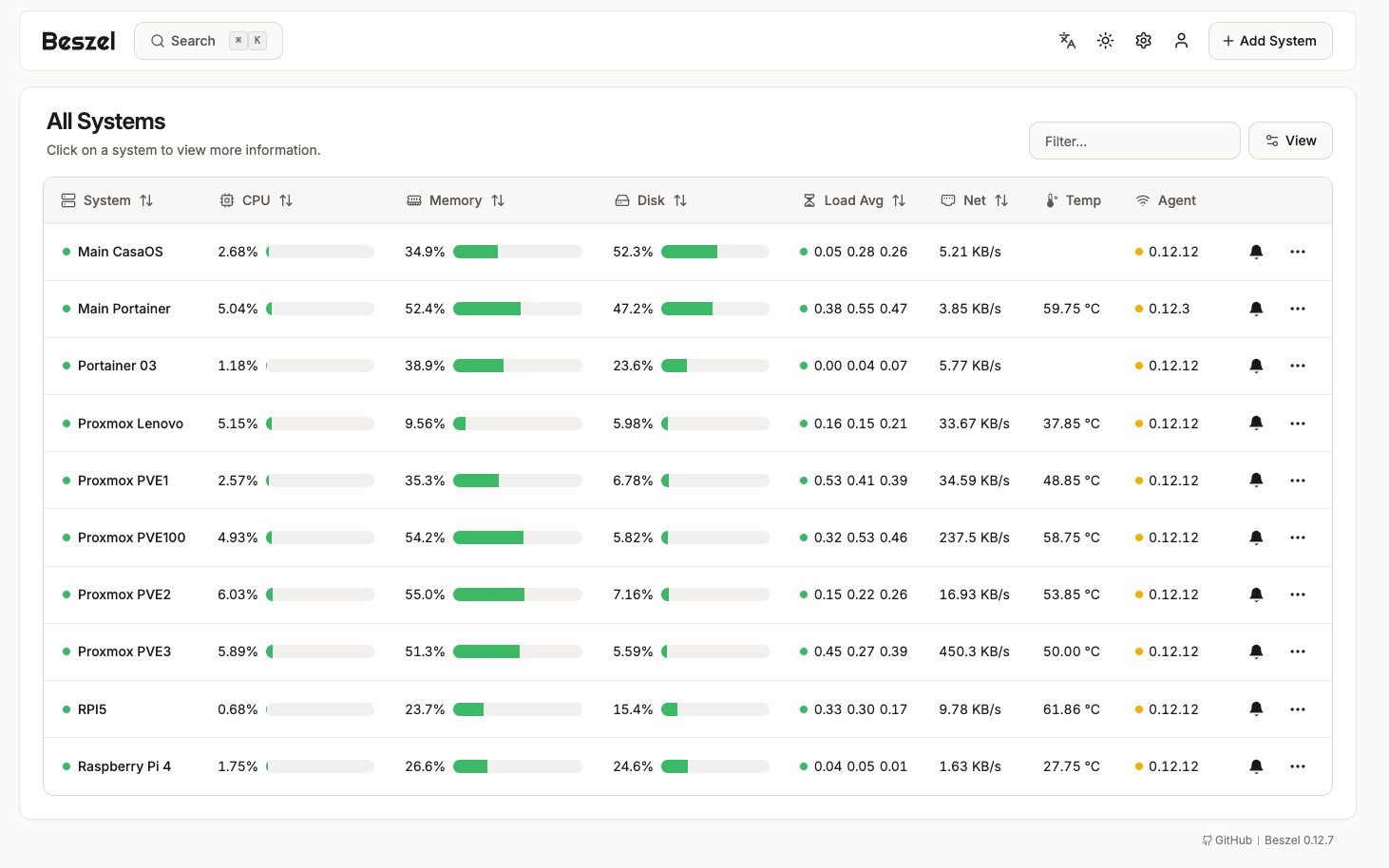
Running a homelab means I’m always tinkering, experimenting, and sometimes even breaking things on purpose just to see how they work. From tiny Raspberry Pis doing small tasks to a beefy server handling heavier workloads, keeping an eye on resource usage and performance is crucial. That’s where Beszel comes into the picture.
Beszel is a self-hosted server monitoring application that lets me collect and view precise data from my servers in a clean, intuitive dashboard. It’s lightweight, fast, and doesn’t require complicated setups or bloated software to do its job.
Why I Use Beszel in My Homelab
Before Beszel, monitoring felt like overkill. Many tools were either too resource-heavy for small devices like my Raspberry Pi or required complex configuration. But Beszel gives me the perfect balance of simplicity and power:
- 📊 Real-time Data – CPU, memory, disk, and network usage are always at my fingertips.
- 💡 Lightweight – It runs without hogging resources, even on my smallest devices.
- 🖥️ Multi-device Monitoring – I can monitor everything, whether it’s my low-powered Pi or my powerful main server.
- ⚡ Simple Setup – Installing and connecting servers to Beszel takes only a few minutes.
For me, the biggest benefit is peace of mind. I don’t have to constantly log into each server to check what’s going on. Everything is neatly displayed in one dashboard.
Setting Up Beszel
Installation is straightforward, especially with Docker, which makes it perfect for homelab enthusiasts:
- Run the Beszel Server
version: "3"
services:
beszel:
image: henrygd/beszel:latest
container_name: beszel
restart: unless-stopped
ports:
- 8090:8090
volumes:
- ./data:/app/data
Once deployed, the web dashboard is available athttp://<your-server-ip>:8090. - Install Beszel Agents
On each server or Raspberry Pi you want to monitor, install the Beszel agent, then link it with the server. - View Metrics
Within minutes, you’ll see CPU, RAM, storage, and network stats rolling in from all your devices.
My Experience with Beszel
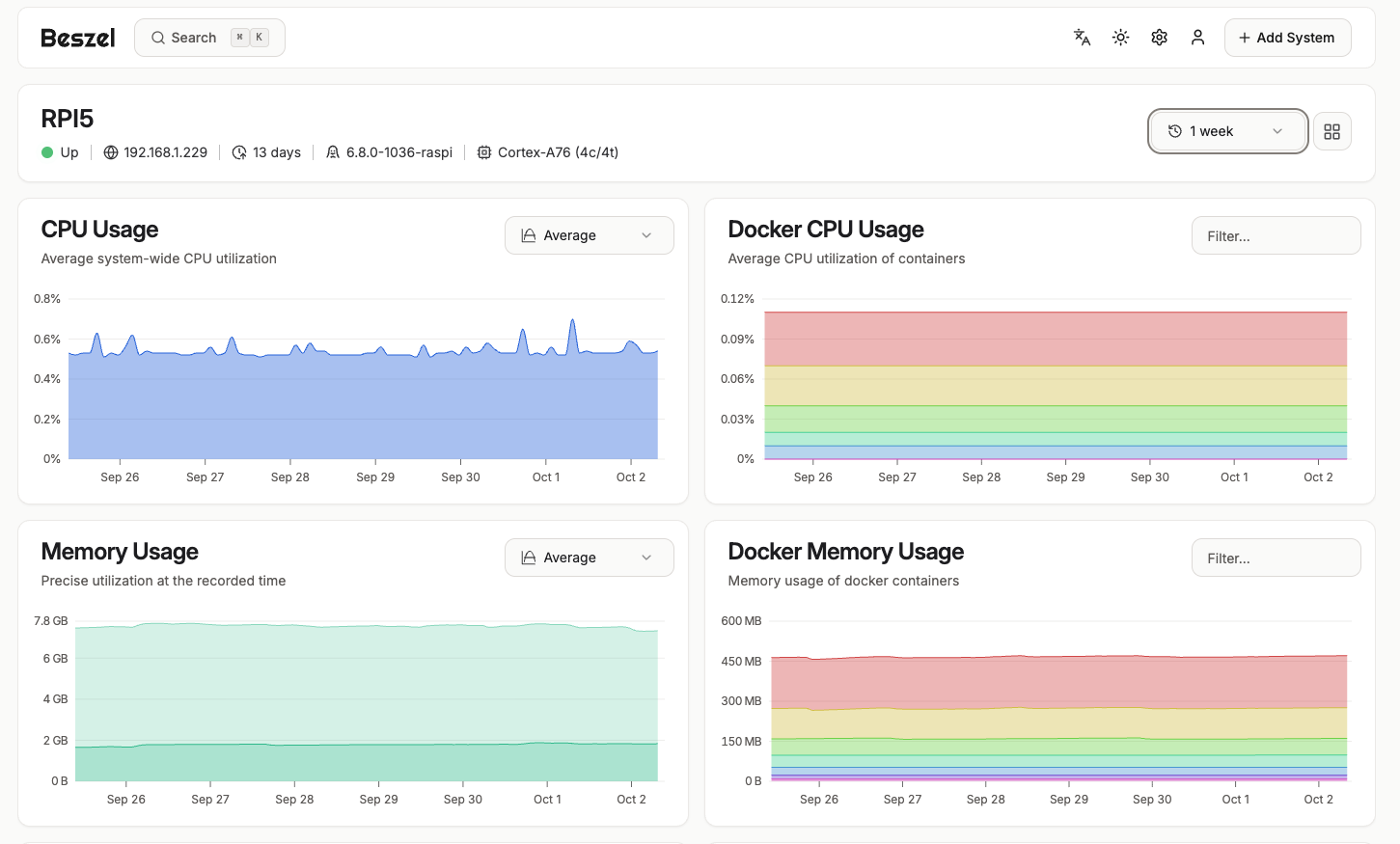
After setting up Beszel, I immediately noticed how much easier it became to manage my homelab. No more guessing whether a container was eating too much RAM or wondering if my Raspberry Pi was running out of space.
Beszel gives me confidence that I’ll spot issues before they become problems. It’s not just about monitoring—it’s about being proactive with my infrastructure.
For example:
- When my Raspberry Pi running Home Assistant started hitting high CPU usage, Beszel showed me the exact spike, and I quickly traced it to a misbehaving add-on.
- On my big server, Beszel helped me identify unnecessary background processes using memory, allowing me to optimize performance.
Final Thoughts
If you’re running a homelab, whether it’s just a single Raspberry Pi or a rack full of servers, Beszel is worth trying. It’s simple, resource-friendly, and gives you the exact data you need without unnecessary complexity.
For me, Beszel has become an essential part of my homelab toolkit—it’s the quiet guardian in the background, giving me the peace of mind that everything is running smoothly.
Thank you so much for taking the time to read my blog post! Your support and engagement truly mean a lot and inspire me to keep creating and sharing more valuable content. If you enjoyed this post, I’d love to hear your thoughts—feel free to leave a comment in the box below and join the conversation. And if you’d like to stay updated with the latest posts, tips, and insights, don’t forget to subscribe to my newsletter. By joining, you’ll be the first to know when new content is published, so you never miss an update.
Historic shirts can bring older football stories back into everyday discussion as the difference between authentic and fan styles can shape how a shirt is used. Discussions about matchday clothing show how football apparel connects design choices with supporter habits. For collectors looking at classic seasons, how to choose a Arsenal football shirt is a natural topic when the focus is on design, fit, and supporter meaning. The choice of a shirt keeps the focus on clubs, supporters, and the stories behind each design.