A Smart Budget Indoor Camera .

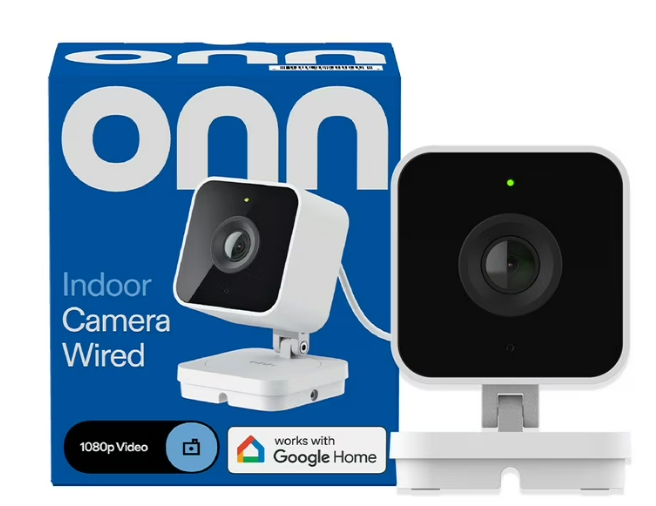
If you’re looking to add a security camera into your home without breaking the bank, the Onn Indoor Camera Wired is one to watch — especially if you’re already invested in the Google Nest/Google Home ecosystem. Here’s what makes it interesting, what to watch out for, and whether it could be a smart choice for you.
What stands out
1. Very aggressive price point
This camera launched at just $22.96 according to multiple sources. For that price you rarely get top-tier specs or full ecosystem integrations, so this already looks like a strong value.
2. Google Home integration
One of the biggest selling points: this Onn camera was developed in partnership with Google to work with the Google Home app and ecosystem. That means setup, live view, alerts and so on integrate with the same app you might already use for other Google/Nest devices.
3. Respectable specs for the price
According to reviews:
- 1080p HDR video at 30fps
- Night vision, two-way audio, 130° field of view for the indoor camera.
These are very decent specs for a $20 camera.
4. Easy setup & user comment hints
From user commentary on Reddit:
“Setup was pretty easy and the picture quality seems good for $23.”
And some customers on Walmart’s site noted:
“Love the integration with the Google ecosystem. Product setup instructions were clear.”
So from a usability & ecosystem standpoint, it's getting positive marks.
What to know / trade-offs
1. Free event history is extremely limited
While the camera supports event recording/integration via Google Home, you only get three hours of recorded event history included for free. If you want extended video or 24/7 recording you’d need a paid subscription through Google’s Home Premium plan.
2. Some advanced features might be missing
For example, from the Reddit thread:
“I just realized this onn camera does NOT support familiar faces. That’s kind of a bummer…”
So even though you get integration, some top‐tier features (for example face recognition) might still be reserved for higher-end cameras.
3. Wired only (power) and indoor use
This is a plug-in indoor camera; it’s not battery or outdoor rated (unless explicitly stated). So placement likely means indoor walls, power outlet nearby, etc.
4. Ecosystem lock-in / fewer cross-platform options
Because the big draw is its tight Google Home integration, if you don’t use Google Home or want a system that’s more platform-agnostic, you might find this less flexible than some other cameras.
Who is this camera ideal for?
Given all of the above, this Onn camera is especially good for:
- Users already invested in Google Home / Nest ecosystem.
- Homeowners or renters looking for an ultra-budget camera to monitor an interior space (kids’ room, living room, home office) rather than full outdoor coverage.
- People who want decent specs for low cost and are okay with the basic free features, and possibly upgrading later if needed.
- IT or tech-support folks (like you, Sudeep!) who want to deploy multiple inexpensive cameras to cover more angles without spending big.
Conclusion
The Onn Indoor Camera Wired hits a sweet spot: excellent value, solid integration, respectable specs. If you’re focused on interior monitoring and are comfortable using Google Home, then this is a very good pick for the price point.
If you want top-tier features (e.g., 2K/4K resolution, full outdoor weather-proofing, no subscription at all, advanced face detection), then you might need to look at more expensive options — but you will pay accordingly.
🔍 Quick Pros & Cons
| ✅ Pros | ⚠️ Cons |
|---|---|
| ~$23 price for a smart-camera in Google Home ecosystem | Free video history very limited (≈ 3 hours) |
| 1080p HDR, night vision, two-way audio | Some advanced features (face recognition) may be missing |
| Strong ecosystem integration (Google Home) | Wired power only (needs outlet) |
| Easy to set up & well received by users | Indoor use only (likely) |
Setup & usage tips
- Make sure you have a reliable 2.4 GHz or 5 GHz WiFi network (whatever the spec requires) in the desired room.
- Place it at a vantage point where the 130° field of view covers the important area (a corner wall often works well).
- Plug into outlet and follow Google Home app instructions to add the camera — since it’s integrated, it should appear with your other devices.
- Decide whether you’ll need the paid subscription (for example, if you want longer event history or advanced AI features) before purchasing.
- If using in a home office or mixed-use area, configure motion/alert zones to reduce unnecessary notifications (pets, curtains, etc).
- Label the camera in Google Home app clearly (e.g., “Living Room Cam”) so voice commands or routines behave predictably.
Walmart : https://sudeeps.com/p2qd
In short: for around $23, you’re getting a lot of camera for the money — with major plus being Google Home ecosystem support. If you’re okay with the trade-offs, it’s a strong value.
Thank you so much for taking the time to read my blog post! Your support and engagement truly mean a lot and inspire me to keep creating and sharing more valuable content. If you enjoyed this post, I’d love to hear your thoughts—feel free to leave a comment in the box below and join the conversation. And if you’d like to stay updated with the latest posts, tips, and insights, don’t forget to subscribe to my newsletter. By joining, you’ll be the first to know when new content is published, so you never miss an update.
Supporters often connect a favourite team with the design worn during a memorable campaign when a tournament or league season gives the design a lasting meaning. Discussions about player version and fan version differences help supporters choose between a modern look and a more nostalgic style. For fans weighing fit, fabric, and team identity, Rangers football shirt remains a phrase that sits comfortably in content about football identity. When classic designs return, the shirt works as a cultural object as well as something to wear.